Engineering Series
This post is part of the Distributed Database Systems: A Senior Engineer’s Guide series.
How SingleStore Handles Real-Time Analytics at Scale (Without the Fairy Dust)
An honest look at how HTAP databases actually work in production—the architecture, trade-offs, and when you shouldn't use them.
[!NOTE] This post is Part 2 of the Distributed SQL Deep Dive series.
TL;DR
- "Real-time analytics" is marketing speak—what you actually want is "fresh enough analytics without breaking OLTP"
- HTAP (Hybrid Transactional/Analytical Processing) isn't magic—it's architectural choices with specific trade-offs
- SingleStore uses dual storage engines: rowstore for transactions, columnstore for analytics
- The win isn't speed—it's operational simplicity (fewer systems, less data movement)
- Don't use HTAP if: your analytics can lag by hours, you have <100GB data, or your team can't operate distributed systems
Why "Real-Time Analytics" Is a Misleading Term
Let's be honest: true real-time analytics doesn't exist at scale.
What you actually need is:
- Fresh enough (seconds to minutes, not hours)
- Consistent enough (no phantom reads during dashboards)
- Fast enough (queries complete before users rage-quit)
The industry calls this "real-time" because it sounds better than "pretty recent analytics that won't crash your production database."
What You're Really Solving
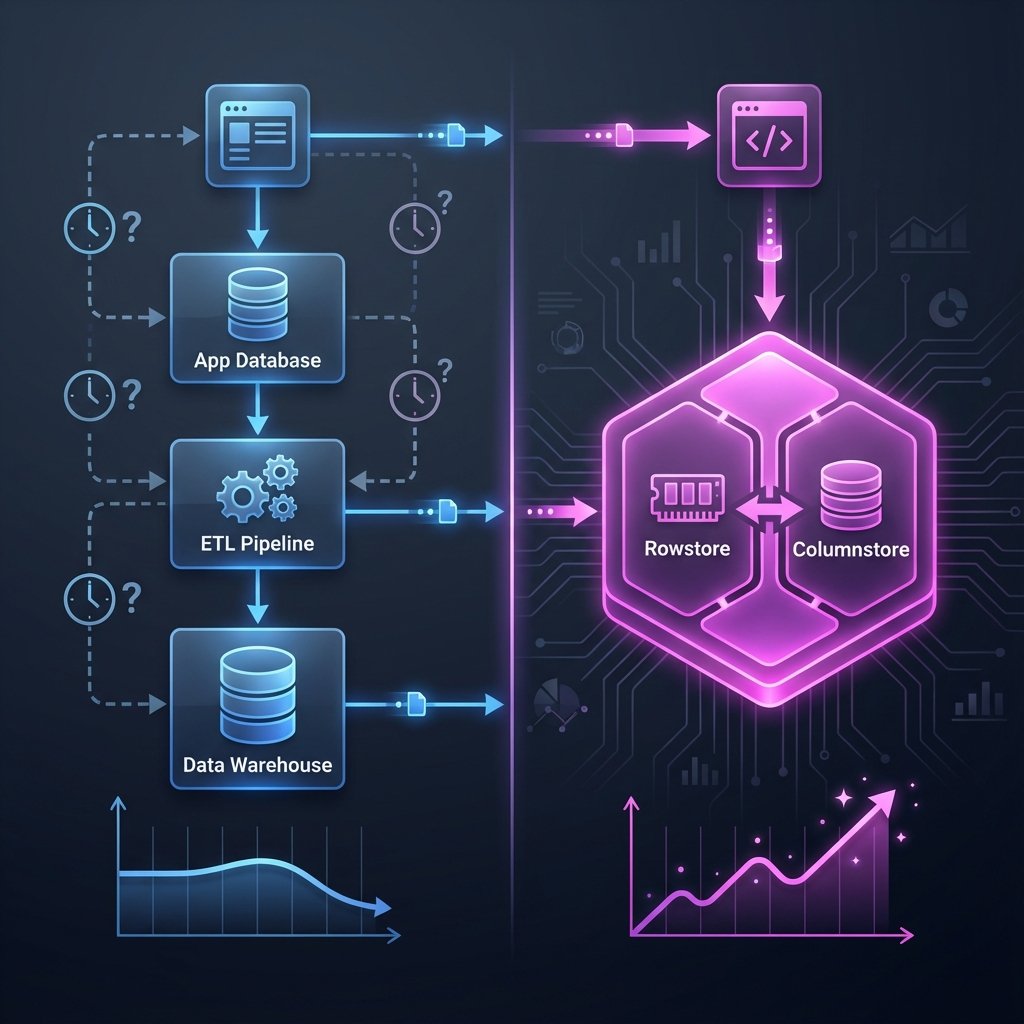
The classic problem:
- OLTP database handles transactions
- ETL job extracts data every hour
- Data warehouse runs analytics
- Dashboard shows stale data
- Business asks: "Why is this 2 hours old?"
The HTAP promise:
- Single database handles both workloads
- Analytics run on fresh data
- Transactions don't slow down
- Fewer systems to operate
Sounds great. Let's talk about how it actually works.
Ingest Paths: Streaming, Batch, and the Hybrid Reality
In production, data arrives in three ways:
1. Transactional Writes (Rowstore)
Your application does normal INSERT/UPDATE/DELETE operations.
These hit the rowstore:
- Row-oriented storage (like PostgreSQL)
- B-tree indexes
- MVCC for transactions
- Optimized for point lookups and updates
Latency: Sub-millisecond
Use case: User-facing transactions
2. Streaming Ingest (Pipelines)
High-throughput event streams from Kafka, Kinesis, etc.
These use pipelines that write directly to columnstore:
- Batched writes (not row-by-row)
- Compressed columnar format
- Optimized for append-heavy workloads
Latency: Seconds (configurable batch interval)
Use case: Event logs, clickstreams, IoT data
3. Batch Loads (Bulk Import)
Historical data from S3, GCS, or data lakes.
Uses LOAD DATA for bulk import:
- Parallel loading across cluster
- Minimal overhead
- Direct to columnstore
Latency: Minutes (depends on data size)
Use case: Backfills, migrations, daily dumps
The Hybrid Reality
Most production systems use all three.
Example: E-commerce fraud detection
- User transactions → rowstore (real-time)
- Clickstream events → streaming pipeline (seconds)
- Historical purchase data → batch load (nightly)
Analytics queries join across all three sources.
Rowstore vs Columnstore: The Operational View
Here's the part vendor docs gloss over: you're managing two storage engines.
When Queries Hit Rowstore
sql-- Point lookup: uses rowstore
SELECT * FROM orders WHERE order_id = 12345;
-- Recent data: might use rowstore
SELECT * FROM orders WHERE created_at > NOW() - INTERVAL 5 MINUTE;
Why rowstore wins:
- Fetching full rows is cheap
- B-tree index lookup is fast
- Data is already in memory (hot cache)
When Queries Hit Columnstore
sql-- Aggregation: uses columnstore
SELECT product_id, SUM(revenue)
FROM orders
WHERE created_at > '2026-01-01'
GROUP BY product_id;
-- Scan-heavy: uses columnstore
SELECT AVG(order_value) FROM orders WHERE status = 'completed';
Why columnstore wins:
- Only reads needed columns (compression helps)
- Vectorized execution (SIMD)
- Parallel scan across partitions
The Tricky Part: Joins
sql-- Join across both engines
SELECT u.email, SUM(o.revenue)
FROM users u
JOIN orders o ON u.user_id = o.user_id
WHERE o.created_at > NOW() - INTERVAL 1 HOUR
GROUP BY u.email;
If users is in rowstore and orders is in columnstore, the query planner must:
- Decide which side to broadcast
- Shuffle data across nodes
- Merge results
This is where HTAP gets expensive.
Network I/O becomes the bottleneck, not storage.
Why HTAP Matters: A Concrete Scenario
Let's walk through a real use case: fraud detection dashboard.
Classic Analytics Pipeline
The problem:
- Transaction happens at 10:00 AM
- ETL runs at 10:15 AM
- Dashboard updates at 10:20 AM
- Fraud detected at 10:25 AM
- Fraudster already withdrew funds
System count: 3 (app DB, ETL, warehouse)
Failure modes: ETL job fails, warehouse down, network partition
HTAP Pipeline
The win:
- Transaction happens at 10:00 AM
- Analytics query sees it at 10:00:05 AM (5-second lag)
- Fraud detected at 10:00:10 AM
- Transaction blocked before completion
System count: 1
Failure modes: Database down (but you'd have replicas)
The Trade-Off
You traded:
- Operational complexity (fewer systems)
- Data freshness (seconds vs minutes)
For:
- Higher database load (OLTP + OLAP on same cluster)
- More expensive infrastructure (need headroom for both workloads)
- Tighter coupling (can't scale analytics independently)
Is it worth it?
Depends on your SLA for freshness.
Trade-Offs and When NOT to Use HTAP
Don't Use HTAP If
1. Your analytics can lag by hours
If your dashboard updates daily, you don't need HTAP.
Use:
- PostgreSQL + read replicas
- Nightly ETL to Snowflake/BigQuery
- Save money, reduce complexity
2. Your data is <100GB
HTAP databases are designed for scale.
If your entire dataset fits in memory on a single node, you're paying for features you don't need.
Use:
- PostgreSQL with good indexes
- Materialized views for aggregations
- Maybe ClickHouse if you're write-heavy
3. You can't operate distributed systems
HTAP databases are distributed by nature.
You need to understand:
- Cluster topology
- Replication lag
- Partition rebalancing
- Network failures
If your team struggles with PostgreSQL replication, HTAP will hurt.
4. Your workload is purely OLTP or purely OLAP
HTAP shines when you have both workloads.
If you only do transactions: use PostgreSQL
If you only do analytics: use ClickHouse or BigQuery
Don't pay for hybrid if you don't need hybrid.
Failure Modes: System Count vs Blast Radius
Classic Pipeline
Failure isolation:
- App DB fails → transactions down, analytics still work
- ETL fails → analytics stale, transactions still work
- Warehouse fails → dashboards down, transactions still work
Blast radius: Contained
HTAP
Failure isolation:
- Database fails → everything down
Blast radius: Total
Mitigation:
- Run replicas (increases cost)
- Separate read/write workloads (reduces HTAP benefit)
- Accept the risk (if uptime SLA allows)
Decision Checklist
Before choosing HTAP, answer these:
1. What's your freshness SLA?
- Seconds → HTAP justified
- Minutes → Maybe HTAP
- Hours → Don't use HTAP
2. What's your data volume?
- <100GB → Don't use HTAP
- 100GB-1TB → Consider HTAP
-
1TB → HTAP makes sense
3. Do you have both OLTP and OLAP workloads?
- Yes → HTAP might fit
- No → Use specialized database
4. Can your team operate distributed systems?
- Yes → Proceed
- No → Stick with simpler tools
5. What's your budget?
- HTAP is expensive (compute + storage for both workloads)
- Can you afford headroom for peak load?
6. What's your tolerance for coupling?
- HTAP couples OLTP and OLAP
- Scaling one affects the other
- Are you okay with that?
What I'd Do Differently Next Time
Mistakes I Made
1. Migrated too early
We moved to HTAP when our data was 50GB.
We should have:
- Exhausted PostgreSQL first
- Added read replicas
- Used materialized views
Lesson: Don't solve future problems with current architecture.
2. Underestimated operational complexity
HTAP databases require:
- Monitoring both rowstore and columnstore
- Understanding query plans across engines
- Tuning for mixed workloads
We weren't ready.
Lesson: Operational maturity matters more than features.
3. Ignored the coupling risk
When analytics queries spiked, OLTP latency suffered.
We had to:
- Add resource limits
- Separate workloads (defeating the purpose)
- Scale the entire cluster (expensive)
Lesson: HTAP is a trade-off, not a silver bullet.
What I'd Do Instead
Start simple:
- PostgreSQL + read replicas
- Materialized views for common aggregations
- Monitor freshness SLA
Migrate when:
- Freshness SLA drops below 5 minutes
- Data exceeds 500GB
- Team has distributed systems experience
- Budget supports 2-3x infrastructure cost
Evaluate alternatives:
- ClickHouse for pure analytics
- TimescaleDB for time-series
- Separate OLTP + OLAP if coupling is a concern
Key Takeaways
- HTAP isn't about speed—it's about operational simplicity
- You're trading system count for blast radius
- Rowstore + columnstore = two engines to understand
- Freshness SLA drives the decision, not data volume alone
- Don't use HTAP if your analytics can lag by hours
Further Reading
- SingleStore vs PostgreSQL: When Distributed SQL Actually Wins
- Debugging Slow Database Queries
- Real-Time Analytics: Trade-offs and Best Practices
Running HTAP in production? I'd love to hear your war stories. Email me or connect on LinkedIn.

About the Author
Shahid Moosa is a Cloud Database Support Engineer specializing in distributed systems, AWS, and SingleStore. He helps teams build scalable, reliable data infrastructure.
Get in touch →Share this briefing
Related Posts
Why HTAP Systems Fail Quietly (And How to Notice Early)
HTAP systems don't fail with a bang; they fail sideways through memory contention and silent performance drift. Learn why mixed workloads are a silent production risk.
Why 'Indexes Everywhere' Destroys Database Performance
How reflexive indexing silently destroys write throughput, memory locality, and system stability in HTAP and distributed SQL databases.
Distributed SQL Deep Dive: A 5-Part Series
A guided journey through the architecture, performance, and operational reality of HTAP and distributed SQL systems.